
Slack, email and webhook notifications
ContactLevel can tell you when an audience syncs and when a website visit is matched. Send these alerts to Slack, to your team by email, or to your own system through a webhook.
Events you can subscribe to
Each channel has the same four events. Tick the ones you want.
Audience sync status
Website visit direct match: we know exactly who visited.
Website visit probable match: the visitor is very likely one of a few people.
Website visit no match: a visit was recorded but the person wasn't identified.
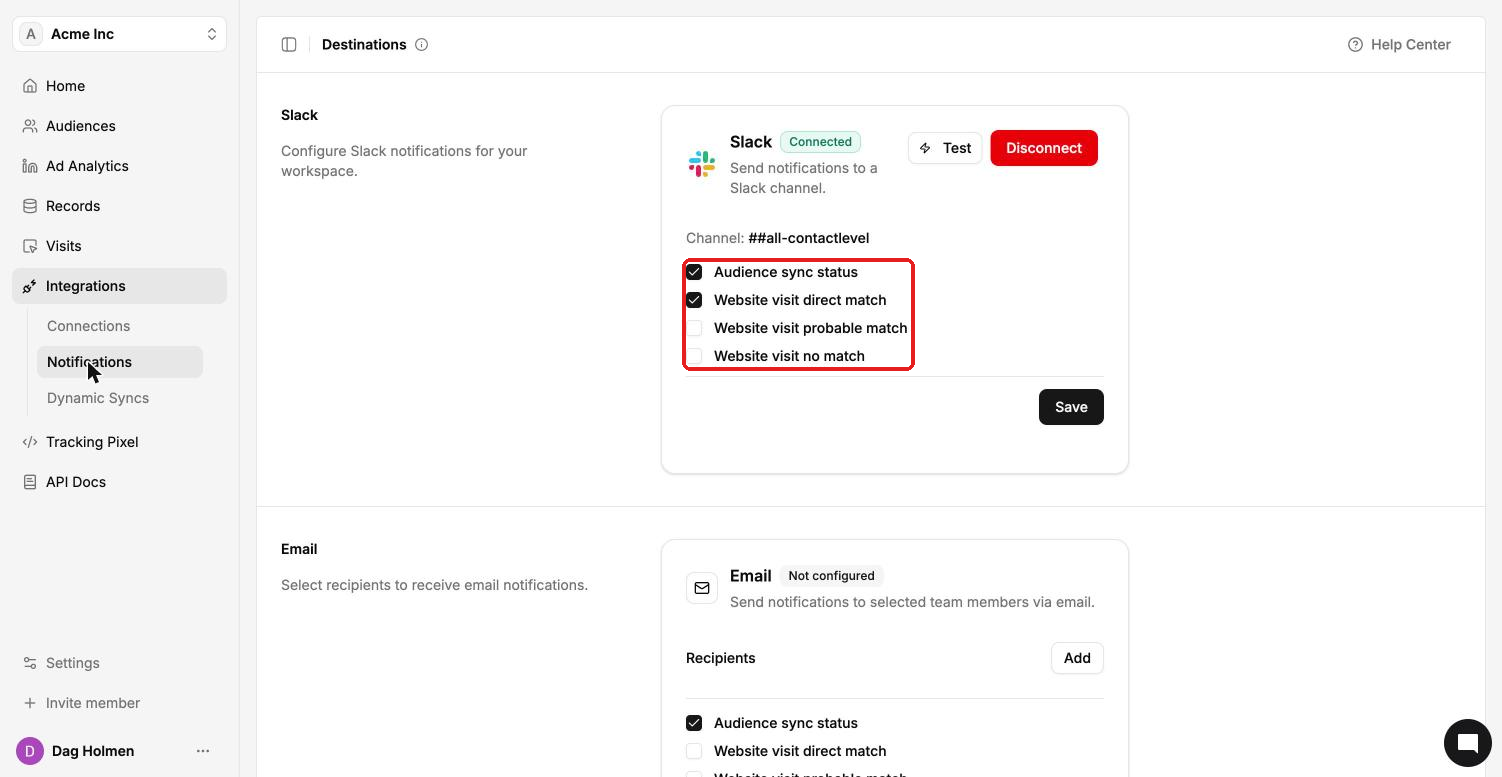
Slack
Go to Integrations → Notifications.
In the Slack section, connect your Slack workspace and pick a channel.
Tick the events you want.
Click Save.
Click Test to send a test message to the channel.
Click Disconnect to stop Slack notifications.
In the Email section, click Add and choose recipients from your team.
Tick the events you want.
Click Save.
Webhooks
Webhooks send a POST request to your URL when an event happens.
In the Webhooks section, click Create webhook.
Enter your endpoint URL and tick the events you want.
Save the webhook.
Click Test to send a sample request to your endpoint. Inspect it to see the data you'll receive.
Your webhooks also appear under Settings → Developers. They're the same webhooks, so a change in one place shows in the other.